


Four Eyes Lite
Simple management for your optical store.
Android app for optical stores
Simple, affordable optical store management, right on your phone or tablet.
Keep customers, eye prescriptions, eyeglass work orders and your store’s finances in one easy-to-use app. It fits the way you already work — not the other way around.
21-day free trial · No card required to start
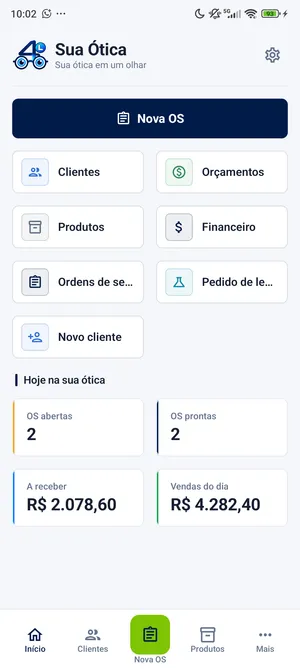
An organized routine
Less paperwork. More control at the counter.
In many optical stores, information is split across paper files, notebooks and spreadsheets — or locked in software that’s too complicated for everyday work. Finding a customer’s prescription or a work order takes longer than it should.
Without Four Eyes Lite
- Customer records on paper
- Prescriptions kept in folders and notebooks
- Work orders and payments in separate notes
With Four Eyes Lite
- Customer, history and prescriptions in one place
- Work orders recorded and easy to look up
- Store finances in one simple view
Features
The essentials of your optical store, in one app.
Optical shop software built for opticians and the day-to-day of small stores: straightforward, with no complicated screens.
Customers and history
Register customers and look up each one’s visit history, prescriptions and work orders.
Eye prescriptions
Record sphere, cylinder, axis, addition, PD and prism for each eye, and find any prescription quickly.
Work orders
Build eyeglass work orders with the prescription, frame, lenses and fitting, and follow each one through to pickup.
Simple finances
Track what you’ve sold, what you’ve received and open balances, without complicated spreadsheets.
Plus, for everyday work
Products and services
Register frames, lenses, products and services to use with every customer.
Print and share
Print work orders on a compatible Bluetooth thermal printer, or share them as a PDF.
Backup and restore
Back up to the device and to Google Drive, and restore whenever you need to.
Phone and tablet
Android 8.0 or later, on your store’s phone or tablet.
Take a look
See the app in action.
Real Four Eyes Lite screens, with sample data. Interface shown in Portuguese.
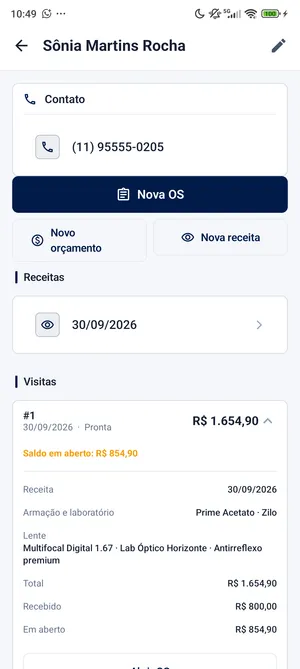
Customer and history 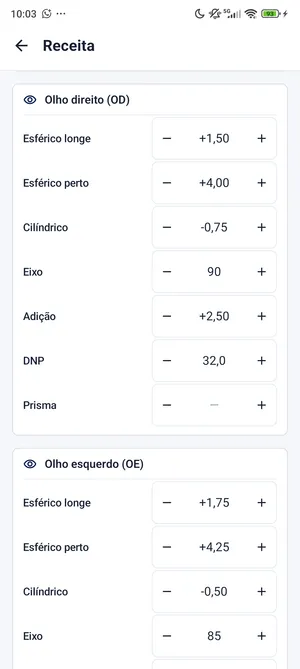
Eye prescription 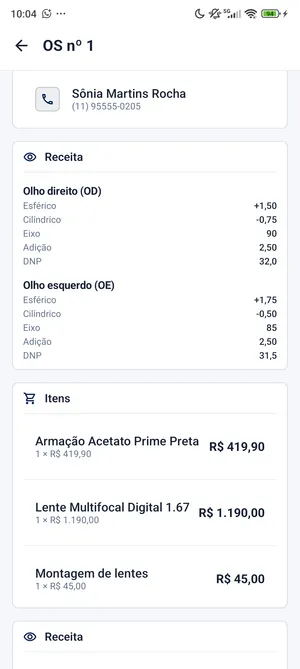
Work order 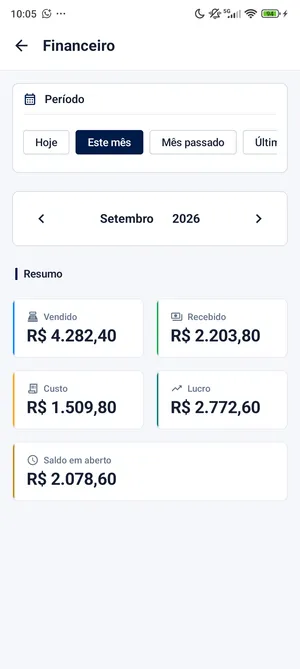
Monthly finances
Pricing
One simple monthly plan.
Start with a 21-day free trial granted by the app — no card required. After that, subscribe through Google Play, which shows the price for your country before you confirm.
Prices vary by country. In Brazil, the plan costs R$19.90/month.
How to get started
- Install Four Eyes Lite from Google Play.
- Create your account in the app.
- Start your 21-day free trial — no card needed.
Monthly plan
Priced for your country on Google Play.
- 21-day free trial
- No card required to start
- Subscription through Google Play after the trial
- One active installation per account
- Android 8.0 or later: phones and tablets
 (opens in a new tab)
Questions
Frequently asked questions
How does the free trial work?
Install Four Eyes Lite from Google Play, create your account and use the app free for 21 days, granted by the app itself. You don’t need to add a card to get started.
How much does it cost, and how do I subscribe?
After the trial, the monthly subscription is purchased through Google Play using the payment method on your Google account. Google Play shows the price for your country; in Brazil, it’s R$19.90 per month.
Which devices are supported?
Android phones and tablets running Android 8.0 or later. Four Eyes Lite is not available for iPhone or Windows.
Do I need to install software on a computer?
No. Four Eyes Lite is an Android app: customers, prescriptions, work orders and finances live on your store’s phone or tablet.
Can I print work orders?
Yes, on Bluetooth thermal printers that support the ESC/POS standard, with 58 mm or 80 mm paper. The printer must be paired with Android first, and work orders can print as customer, store and lab-fitting copies. Since printer models vary, it’s worth testing yours during the free trial.
Can I send a work order on WhatsApp?
Yes. The app creates the work order as a PDF and opens Android’s share menu, where you can choose WhatsApp (if installed), email or another app.
How does backup work?
You can back up to the device itself and to Google Drive, and restore your data whenever you need to — for example, when you switch phones or tablets.
Can I use it on more than one device?
Each account has one active installation at a time. You can switch devices: activating the new one makes the previous one inactive, and you can only switch again after 7 days. Data is not synced between devices; to move it to the new one, use backup and restore.
Is there a free version?
There’s no permanent free plan. You can try Four Eyes Lite free for 21 days and then continue with the monthly plan through Google Play.
App documents (in Portuguese)
The Four Eyes line
Start with the essentials.
When your optical store needs more, discover the upcoming Four Eyes solutions.
Available now
Four Eyes Lite
The essentials to organize your store’s routine, on Android.
Coming later
Four Eyes Mobile
A more complete solution for the next stages of your business.
Coming later
Four Eyes Web
More features for when your store grows.
Bring order to your optical store.
Get Four Eyes Lite on Google Play and start your 21-day free trial — no card required.